
- Visit the SSM4U portal at https://www.ssm4u.com.my
- Click ‘Register Now’.
- Fill in your name, email address, ID number and ID Type
(MyKAD, MyPR, MyKAS or MyTentera). - Click ‘Proceed’.
- The ‘User Profile Registration’ page will appear. Users are required to create a password and fill in the necessary information.
- Tick ✓ on Terms & Conditions.
- Click ‘Register’ and then click ‘OK’ to submit the registration.
- A ‘Registration Success’ message will appear on the screen.
- Users will receive a verification email to verify their registered email address.
- Kindly review the email verification message and confirm the email address registered on the SSM4U Portal.
- Enter your user ID and password in the designated fields access the SSM4U portal.
NEXT STEP :- Account Verification for
Local Users
SSM4U users who register using ID types MYKAD, MYPR, MYKAS and MYTENTERA may verify their accounts
through the following methods:
a) By visiting the nearest SSM counter in person; or
1. For physical verification of your SSM4U account at any SSM counters, the identification card must be presented for fingerprint verification purposes
https://www.ssm.com.my/Pages/contact-us.aspx
2. Users are required to place their thumb on the card reader for fingerprint verification.
3. Upon successful fingerprint verification, an email confirmation will be sent indicating that the SSM4U
account has been verified. The account may then be assessed using the registered email address and
password.
b) Via the Tap.it Kiosk.
- SSM4U users who register using ID types MYKAD, MYPR, MYKAS and MYTENTERA may verify their accounts
through Tap.it Kiosk.
To check the locations of Tap.it SSM Kiosks, kindly visit
this link https://www.tapitnetworks.com/location-ssm - Please tap the Kiosk screen to begin the transaction and select the ‘SSM’ icon to proceed.
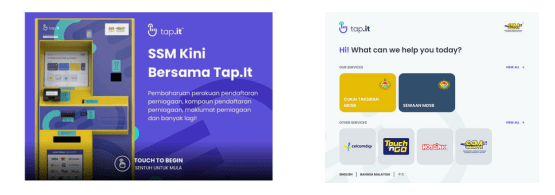
3. Select “SSM4U Activation” to activate your SSM4U
account.
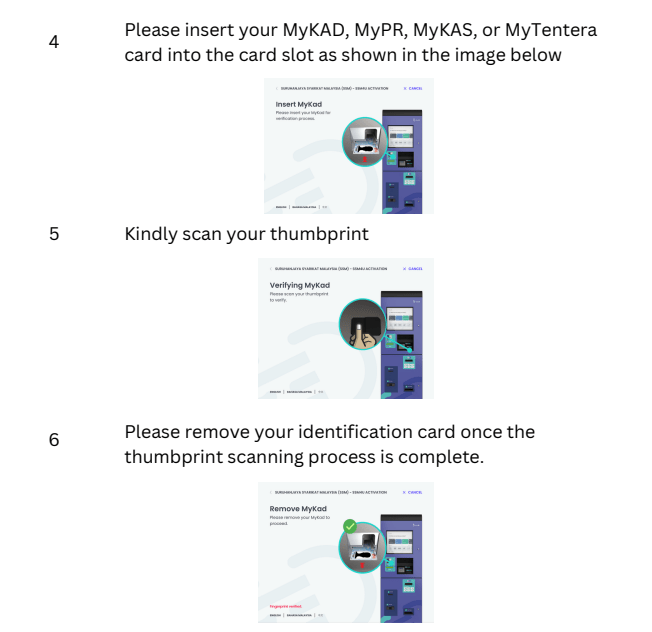
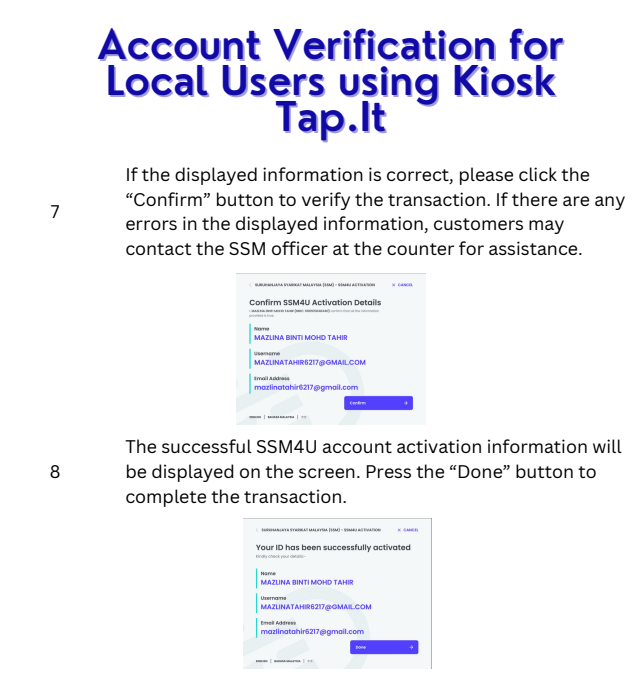
9. Then you will receive an email notification regarding the activation of your SSM4U account. The email will confirm that your account has been successfully activated.
SOURCE: https://www.ssm.com.my/Documents/GUIDELINE_FOR_REGISTER_EZBIZ_USER_ACCOUNT.pdf